In this comprehensive tutorial, we’ll create a full-stack CRUD Todo application using Java, Spring Boot, JavaScript, React JS, and a MySQL database. This guide will walk you through building the backend REST APIs with Spring Boot and the frontend React application to consume these APIs.

Create a Spring Boot Project
Using Spring Initializr
First, create a Spring Boot project using Spring Initializr. Set up your project with the necessary dependencies, including Spring Web, Spring Data JPA, MySQL Driver, and Lombok.
Add Maven Dependencies
Update your pom.xml file with the following dependencies:
<dependency>
    <groupId>org.springframework.boot</groupId>
    <artifactId>spring-boot-starter-data-jpa</artifactId>
</dependency>
<dependency>
    <groupId>org.springframework.boot</groupId>
    <artifactId>spring-boot-starter-web</artifactId>
</dependency>
<dependency>
    <groupId>com.mysql</groupId>
    <artifactId>mysql-connector-j</artifactId>
    <scope>runtime</scope>
</dependency>
<dependency>
    <groupId>org.projectlombok</groupId>
    <artifactId>lombok</artifactId>
    <optional>true</optional>
</dependency>
<dependency>
    <groupId>org.springframework.boot</groupId>
    <artifactId>spring-boot-starter-test</artifactId>
    <scope>test</scope>
</dependency>
<dependency>
    <groupId>org.modelmapper</groupId>
    <artifactId>modelmapper</artifactId>
    <version>3.1.1</version>
</dependency>
Explanation:
spring-boot-starter-data-jpa: Starter for using Spring Data JPA with Hibernate.spring-boot-starter-web: Starter for building web, including RESTful, applications using Spring MVC.mysql-connector-j: MySQL JDBC driver.lombok: Java library that automatically plugs into your editor and build tools, spicing up your Java.spring-boot-starter-test: Starter for testing Spring Boot applications.modelmapper: Simplifies the mapping of objects.
Configure MySQL Database
Add your MySQL database configuration to the application.properties file:
spring.datasource.url=jdbc:mysql://localhost:3306/todo_management
spring.datasource.username=root
spring.datasource.password=Mysql@123
spring.jpa.properties.hibernate.dialect=org.hibernate.dialect.MySQLDialect
spring.jpa.hibernate.ddl-auto=update
Explanation:
spring.datasource.url: JDBC URL for the MySQL database.spring.datasource.username: Database username.spring.datasource.password: Database password.spring.jpa.properties.hibernate.dialect: Hibernate dialect for MySQL.spring.jpa.hibernate.ddl-auto: Automatically create/update database tables based on entity classes.
Create the Todo Entity
Create a Todo JPA entity:
package net.javaguides.todo.entity;

import jakarta.persistence.*;
import lombok.*;

@Setter
@Getter
@NoArgsConstructor
@AllArgsConstructor
@Entity
@Table(name = "todos")
public class Todo {
    @Id
    @GeneratedValue(strategy = GenerationType.IDENTITY)
    private Long id;

    @Column(nullable = false)
    private String title;

    @Column(nullable = false)
    private String description;

    private boolean completed;
}
Explanation:
@Entity: Specifies that the class is an entity and is mapped to a database table.@Table(name = "todos"): Specifies the table name in the database.@Id: Specifies the primary key of an entity.@GeneratedValue(strategy = GenerationType.IDENTITY): Provides the specification of generation strategies for the values of primary keys.@Column(nullable = false): Specifies the details of the column to which a field or property will be mapped.nullable = falsemeans the column will not accept null values.@Setter,@Getter,@NoArgsConstructor,@AllArgsConstructor: Lombok annotations to generate boilerplate code like getters, setters, and constructors.
Create TodoRepository
Create the TodoRepository interface:
package net.javaguides.todo.repository;

import net.javaguides.todo.entity.Todo;
import org.springframework.data.jpa.repository.JpaRepository;

public interface TodoRepository extends JpaRepository<Todo, Long> {
}
Explanation:
JpaRepository<Todo, Long>: Interface for generic CRUD operations on a repository for a specific type. Here,Todois the entity type andLongis the type of its primary key.
Create TodoDto
Create a TodoDto class:
package net.javaguides.todo.dto;

import lombok.*;

@Setter
@Getter
@NoArgsConstructor
@AllArgsConstructor
public class TodoDto {
    private Long id;
    private String title;
    private String description;
    private boolean completed;
}
Explanation:
- This DTO (Data Transfer Object) is used to transfer data between the client and server without exposing the entity directly.
Create Custom Exception – ResourceNotFoundException
Create a ResourceNotFoundException class:
package net.javaguides.todo.exception;

import org.springframework.http.HttpStatus;
import org.springframework.web.bind.annotation.ResponseStatus;

@ResponseStatus(value = HttpStatus.NOT_FOUND)
public class ResourceNotFoundException extends RuntimeException {
    public ResourceNotFoundException(String message) {
        super(message);
    }
}
Explanation:
@ResponseStatus(value = HttpStatus.NOT_FOUND): Marks the exception with a response status code of 404 Not Found.
Create Service Layer – TodoService Interface
Create the TodoService interface:
package net.javaguides.todo.service;

import net.javaguides.todo.dto.TodoDto;

import java.util.List;

public interface TodoService {
    TodoDto addTodo(TodoDto todoDto);
    TodoDto getTodo(Long id);
    List<TodoDto> getAllTodos();
    TodoDto updateTodo(TodoDto todoDto, Long id);
    void deleteTodo(Long id);
    TodoDto completeTodo(Long id);
    TodoDto inCompleteTodo(Long id);
}
Explanation:
- Defines the contract for the service layer with methods for CRUD operations and additional operations like marking a todo as complete or incomplete.
Implement Service Layer – TodoServiceImpl
Implement the TodoService interface:
package net.javaguides.todo.service.impl;

import lombok.AllArgsConstructor;
import net.javaguides.todo.dto.TodoDto;
import net.javaguides.todo.entity.Todo;
import net.javaguides.todo.exception.ResourceNotFoundException;
import net.javaguides.todo.repository.TodoRepository;
import net.javaguides.todo.service.TodoService;
import org.modelmapper.ModelMapper;
import org.springframework.stereotype.Service;

import java.util.List;
import java.util.stream.Collectors;

@Service
@AllArgsConstructor
public class TodoServiceImpl implements TodoService {

    private TodoRepository todoRepository;
    private ModelMapper modelMapper;

    @Override
    public TodoDto addTodo(TodoDto todoDto) {
        Todo todo = modelMapper.map(todoDto, Todo.class);
        Todo savedTodo = todoRepository.save(todo);
        return modelMapper.map(savedTodo, TodoDto.class);
    }

    @Override
    public TodoDto getTodo(Long id) {
        Todo todo = todoRepository.findById(id)
                .orElseThrow(() -> new ResourceNotFoundException("Todo not found with id: " + id));
        return modelMapper.map(todo, TodoDto.class);
    }

    @Override
    public List<TodoDto> getAllTodos() {
        List<Todo> todos = todoRepository.findAll();
        return todos.stream().map(todo -> modelMapper.map(todo, TodoDto.class)).collect(Collectors.toList());
    }

    @Override
    public TodoDto updateTodo(TodoDto todoDto, Long id) {
        Todo todo = todoRepository.findById(id)
                .orElseThrow(() -> new ResourceNotFoundException("Todo not found with id: " + id));
        todo.setTitle(todoDto.getTitle());
        todo.setDescription(todoDto.getDescription());
        todo.setCompleted(todoDto.isCompleted());
        Todo updatedTodo = todoRepository.save(todo);
        return modelMapper.map(updatedTodo, TodoDto.class);
    }

    @Override
    public void deleteTodo(Long id) {
        Todo todo = todoRepository.findById(id)
                .orElseThrow(() -> new ResourceNotFoundException("Todo not found with id: " + id));
        todoRepository.deleteById(id);
    }

    @Override
    public TodoDto completeTodo(Long id) {
        Todo todo = todoRepository.findById(id)
                .orElseThrow(() -> new ResourceNotFoundException("Todo not found with id: " + id));
        todo.setCompleted(true);
        Todo updatedTodo = todoRepository.save(todo);
        return modelMapper.map(updatedTodo, TodoDto.class);
    }

    @Override
    public TodoDto inCompleteTodo(Long id) {
        Todo todo = todoRepository.findById(id)
                .orElseThrow(() -> new ResourceNotFoundException("Todo not found with id: " + id));
        todo.setCompleted(false);
        Todo updatedTodo = todoRepository.save(todo);
        return modelMapper.map(updatedTodo, TodoDto.class);
    }
}
Explanation:
TodoServiceImplimplements theTodoServiceinterface and is annotated with@Service, indicating that it is a service component in Spring.- Uses
ModelMapperto convert betweenTodoentities andTodoDtoobjects. - Handles CRUD operations and marks todos as complete/incomplete. If an entity is not found, it throws
ResourceNotFoundException.
Create REST Controller – TodoController
Create the TodoController class:
package net.javaguides.todo.controller;

import lombok.AllArgsConstructor;
import net.javaguides.todo.dto.TodoDto;
import net.javaguides.todo.service.TodoService;
import org.springframework.http.HttpStatus;
import org.springframework.http.ResponseEntity;
import org.springframework.web.bind.annotation.*;

import java.util.List;

@CrossOrigin("*")
@RestController
@RequestMapping("api/todos")
@AllArgsConstructor
public class TodoController {

    private TodoService todoService;

    @PostMapping
    public ResponseEntity<TodoDto> addTodo(@RequestBody TodoDto todoDto) {
        TodoDto savedTodo = todoService.addTodo(todoDto);
        return new ResponseEntity<>(savedTodo, HttpStatus.CREATED);
    }

    @GetMapping("{id}")
    public ResponseEntity<TodoDto> getTodo(@PathVariable("id") Long todoId) {
        TodoDto todoDto = todoService.getTodo(todoId);
        return new ResponseEntity<>(todoDto, HttpStatus.OK);
    }

    @GetMapping
    public ResponseEntity<List<TodoDto>> getAllTodos() {
        List<TodoDto> todos = todoService.getAllTodos();
        return ResponseEntity.ok(todos);
    }

    @PutMapping("{id}")
    public ResponseEntity<TodoDto> updateTodo(@RequestBody TodoDto todoDto, @PathVariable("id") Long todoId) {
        TodoDto updatedTodo = todoService.updateTodo(todoDto, todoId);
        return ResponseEntity.ok(updatedTodo);
    }

    @DeleteMapping("{id}")
    public ResponseEntity<String> deleteTodo(@PathVariable("id") Long todoId) {
        todoService.deleteTodo(todoId);
        return ResponseEntity.ok("Todo deleted successfully!");
    }

    @PatchMapping("{id}/complete")
    public ResponseEntity<TodoDto> completeTodo(@PathVariable("id") Long todoId) {
        TodoDto updatedTodo = todoService.completeTodo(todoId);
        return ResponseEntity.ok(updatedTodo);
    }

    @PatchMapping("{id}/in-complete")
    public ResponseEntity<TodoDto> inCompleteTodo(@PathVariable("id") Long todoId) {
        TodoDto updatedTodo = todoService.inCompleteTodo(todoId);
        return ResponseEntity.ok(updatedTodo);
    }
}
Explanation:
@RestController: Indicates that the class is a REST controller.@RequestMapping("api/todos"): Maps HTTP requests to/api/todos.@CrossOrigin("*"): Allows cross-origin requests from any domain.- Defines endpoints for adding, retrieving, updating, deleting, and marking todos as complete/incomplete.
Create React App
Setting Up the React Application
Run the following command to create a new React app using Vite:
npm create vite@latest todo-ui
Adding Bootstrap in React Using NPM
Open a new terminal window, navigate to your project’s folder, and run the following command:
npm install bootstrap --save
Add the following code to the src/main.js file:
import React from 'react'
import ReactDOM from 'react-dom/client'
import App from './App.jsx'
import './index.css'
import 'bootstrap/dist/css/bootstrap.min.css'

ReactDOM.createRoot(document.getElementById('root')).render(
  <React.StrictMode>
    <App />
  </React.StrictMode>,
)
Connect React App to Todo REST APIs
We will use the Axios HTTP library to make REST API calls in our React application. Install Axios using the following NPM command:
npm add axios --save
Create a TodoService.js file and add the following code to it:
import axios from "axios";

const BASE_REST_API_URL = 'http://localhost:8080/api/todos';

export const getAllTodos = () => axios.get(BASE_REST_API_URL);

export const saveTodo = (todo) => axios.post(BASE_REST_API_URL, todo);

export const getTodo = (id) => axios.get(BASE_REST_API_URL + '/' + id);

export const updateTodo = (id, todo) => axios.put(BASE_REST_API_URL + '/' + id, todo);

export const deleteTodo = (id) => axios.delete(BASE_REST_API_URL + '/' + id);

export const completeTodo = (id) => axios.patch(BASE_REST_API_URL + '/' + id + '/complete');

export const inCompleteTodo = (id) => axios.patch(BASE_REST_API_URL + '/' + id + '/in-complete');
Explanation:
- This JavaScript module contains a set of API utility functions using Axios to make HTTP requests to the backend server and manage todo items. These functions facilitate operations corresponding to RESTful services like retrieving, saving, updating, deleting, and marking todos as complete or incomplete.
Configure Routing in React App
To use React Router, you first have to install it using NPM:
npm install react-router-dom --save
Open the App.jsx file and add the following content to it:
import { BrowserRouter, Routes, Route } from 'react-router-dom';
import ListTodoComponent from './components/ListTodoComponent';
import HeaderComponent from './components/HeaderComponent';
import FooterComponent from './components/FooterComponent';
import TodoComponent from './components/TodoComponent';
import './App.css';

function App() {
  return (
    <>
      <BrowserRouter>
        <HeaderComponent />
        <Routes>
          <Route path='/' element={<ListTodoComponent />} />
          <Route path='/todos' element={<ListTodoComponent />} />
          <Route path='/add-todo' element={<TodoComponent />} />
          <Route path='/update-todo/:id' element={<TodoComponent />} />
        </Routes>
        <FooterComponent />
      </BrowserRouter>
    </>
  );
}

export default App;
Explanation:
BrowserRouter: Provides routing context to the nested components.RoutesandRoute: Define the navigation routes for the application.- Static components like
HeaderComponentandFooterComponentare always visible. - Different paths render different components (
ListTodoComponentfor listing todos,TodoComponentfor adding or updating todos).
Create React Components
ListTodoComponent
import React, { useEffect, useState } from 'react';
import { completeTodo, deleteTodo, getAllTodos, inCompleteTodo } from '../services/TodoService';
import { useNavigate } from 'react-router-dom';

const ListTodoComponent = () => {
  const [todos, setTodos] = useState([]);
  const navigate = useNavigate();

  useEffect(() => {
    listTodos();
  }, []);

  const listTodos = () => {
    getAllTodos().then((response) => {
      setTodos(response.data);
    }).catch(error => {
      console.error(error);
    });
  };

  const addNewTodo = () => {
    navigate('/add-todo');
  };

  const updateTodo = (id) => {
    navigate(`/update-todo/${id}`);
  };

  const removeTodo = (id) => {
    deleteTodo(id).then((response) => {
      listTodos();
    }).catch(error => {
      console.error(error);
    });
  };

  const markCompleteTodo = (id) => {
    completeTodo(id).then((response) => {
      listTodos();
    }).catch(error => {
      console.error(error);
    });
  };

  const markInCompleteTodo = (id) => {
    inCompleteTodo(id).then((response) => {
      listTodos();
    }).catch(error => {
      console.error(error);
    });
  };

  return (
    <div className='container'>
      <h2 className='text-center'>List of Todos</h2>
      <button className='btn btn-primary mb-2' onClick={addNewTodo}>Add Todo</button>
      <div>
        <table className='table table-bordered table-striped'>
          <thead>
            <tr>
              <th>Todo Title</th>
              <th>Todo Description</th>
              <th>Todo Completed</th>
              <th>Actions</th>
            </tr>
          </thead>
          <tbody>
            {todos.map(todo => (
              <tr key={todo.id}>
                <td>{todo.title}</td>
                <td>{todo.description}</td>
                <td>{todo.completed ? 'YES' : 'NO'}</td>
                <td>
                  <button className='btn btn-info' onClick={() => updateTodo(todo.id)}>Update</button>
                  <button className='btn btn-danger' onClick={() => removeTodo(todo.id)} style={{ marginLeft: '10px' }}>Delete</button>
                  <button className='btn btn-success' onClick={() => markCompleteTodo(todo.id)} style={{ marginLeft: '10px' }}>Complete</button>
                  <button className='btn btn-info' onClick={() => markInCompleteTodo(todo.id)} style={{ marginLeft: '10px' }}>In Complete</button>
                </td>
              </tr>
            ))}
          </tbody>
        </table>
      </div>
    </div>
  );
};

export default ListTodoComponent;
Explanation:
- Manages the display and operations of todo items.
- Fetches the list of todos on component mount.
- Provides functions for adding, updating, deleting, and marking todos as complete or incomplete.
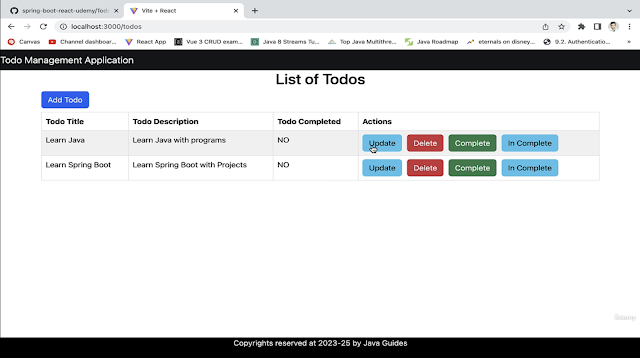
- Renders a table with buttons for each action.
HeaderComponent
import React from 'react';

const HeaderComponent = () => {
  return (
    <header>
      <nav className='navbar navbar-expand-md navbar-dark bg-dark'>
        <div>
          <a href='http://localhost:3000' className='navbar-brand'>
            Todo Management Application
          </a>
        </div>
      </nav>
    </header>
  );
};

export default HeaderComponent;
Explanation:
- Renders the application’s header with a navigation bar.
FooterComponent
import React from 'react';

const FooterComponent = () => {
  return (
    <footer className='footer'>
      <p className='text-center'>Copyrights reserved at 2023-25 by Java Guides</p>
    </footer>
  );
};

export default FooterComponent;
Explanation:
- Renders the application’s footer.
TodoComponent
import React, { useEffect, useState } from 'react';
import { getTodo, saveTodo, updateTodo } from '../services/TodoService';
import { useNavigate, useParams } from 'react-router-dom';

const TodoComponent = () => {
  const [title, setTitle] = useState('');
  const [description, setDescription] = useState('');
  const [completed, setCompleted] = useState(false);
  const navigate = useNavigate();
  const { id } = useParams();

  const saveOrUpdateTodo = (e) => {
    e.preventDefault();
    const todo = { title, description, completed };

    if (id) {
      updateTodo(id, todo).then((response) => {
        navigate('/todos');
      }).catch(error => {
        console.error(error);
      });
    } else {
      saveTodo(todo).then((response) => {
        navigate('/todos');
      }).catch(error => {
        console.error(error);
      });
    }
  };

  const pageTitle = () => {
    return id ? <h2 className='text-center'>Update Todo</h2> : <h2 className='text-center'>Add Todo</h2>;
  };

  useEffect(() => {
    if (id) {
      getTodo(id).then((response) => {
        setTitle(response.data.title);
        setDescription(response.data.description);
        setCompleted(response.data.completed);
      }).catch(error => {
        console.error(error);
      });
    }
  }, [id]);

  return (
    <div className='container'>
      <div className='row'>
        <div className='card col-md-6 offset-md-3 offset-md-3'>
          {pageTitle()}
          <div className='card-body'>
            <form>
              <div className='form-group mb-2'>
                <label className='form-label'>Todo Title:</label>
                <input
                  type='text'
                  className='form-control'
                  placeholder='Enter Todo Title'
                  name='title'
                  value={title}
                  onChange={(e) => setTitle(e.target.value)}
                />
              </div>

              <div className='form-group mb-2'>
                <label className='form-label'>Todo Description:</label>
                <input
                  type='text'
                  className='form-control'
                  placeholder='Enter Todo Description'
                  name='description'
                  value={description}
                  onChange={(e) => setDescription(e.target.value)}
                />
              </div>

              <div className='form-group mb-2'>
                <label className='form-label'>Todo Completed:</label>
                <select
                  className='form-control'
                  value={completed}
                  onChange={(e) => setCompleted(e.target.value)}
                >
                  <option value="false">No</option>
                  <option value="true">Yes</option>
                </select>
              </div>

              <button className='btn btn-success' onClick={saveOrUpdateTodo}>Submit</button>
            </form>
          </div>
        </div>
      </div>
    </div>
  );
};

export default TodoComponent;
Explanation:
- Handles both adding new todos and updating existing ones.
- Initializes state variables for
title,description, andcompleted. - Fetches todo details if an ID is present, allowing for editing.
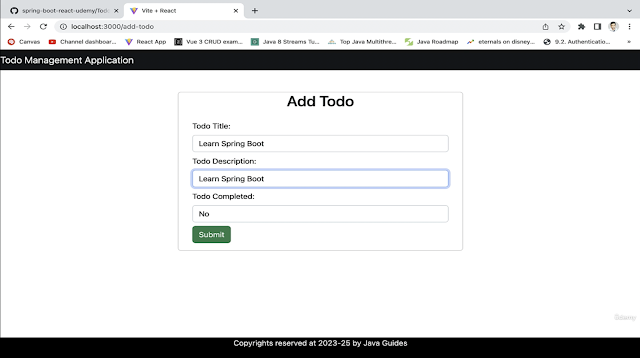
- Displays a form with fields for entering the todo’s title, description, and completion status, along with a submit button to save or update the todo.
Run React App
Run the React application by hitting the following URL in your browser: http://localhost:3000
Add Todo Page:
List Todo Page with Update, Delete, Complete, In Complete:
Update Todo Page:

Source Code on GitHub
The source code for this project is available in my GitHub repository.